Pages

Monday, June 20, 2011

Computers


In a poll, I asked 10 people to name the top 5 MOST important pieces of equipment used in a professional recording. Below are the popular answers that they gave me:

               1.     Microphone
               2.     Console
               3.     Speakers
               4.     Headphones
               5.     Instruments

I can understand where these answers come from. When you look at any music video that takes place in the music studios, the things that take the main focus aside from the artist are the instruments and microphones and the console.

As a recording engineer, I would have to agree that the above-mentioned items are important, but even more important is the computer and software used to record the artist. The software allows for the recording and editing of the song but the computer is the powerhouse that drives everything.

Typically there is a choice of 2 computers to pick from for your recording studio, a Mac or a PC, but which should you pick?

Lets start with the Pros and Cons of each
 
    PC

           Pros-
                    -       More universally known
                    -       Easier to service
                    -       Actual computer is inexpensive
          Cons-
                    -       Thousands of known viruses and more susceptible to them
                    -       Not as user friendly as a Mac


Pros-
          -       Visually appealing
          -       Very user friendly
          -       Pro Tools is Native to Mac (meaning pro tools was made for use on a Mac computer only and then later redesigned to be compatible with PC), Making Pro tools have less glitches and software problems with Mac then PC
          -       Higher quality sound and video processing
       Cons-
          -       Prices for a Mac are higher then for a PC (very expensive)


I might be a little bias when it comes to picking a Computer type because I currently own a Mac and think that it is one of the greatest inventions on the planet. But actually having worked with both a Mac and a PC in the actual studio, I have learned that working with a Mac is more efficient in all aspects. It is easier to work with Pro Tools and it is even easier to configure all devices to it. I have fewer Problems with the actual software with a Mac then with a PC. It is very common for Pro Tools to have problems and shut down but it seems to happen more frequently with the PC.

So since studio time is so expensive, you want to try and minimize the amount of time you spend troubleshooting. Even thought it is cheaper to purchase a PC, in the long run it will benefit you and your future clients to purchase the more expensive Mac.




Monday, June 6, 2011

ESPN Shoot

I had an amazing time at the ESPN U shoot!!


Monday, May 23, 2011

Interview Blog


Negotiation

Horacio Daniel Cabello is a band member, music writer, engineer (mixing and editing) and producer. Besides the stated, he is also a fierce negotiator. Not only does Mr. Cabello negotiate with his band members but he also negotiates with his clients from his home studio.

During our phone conversation I asked Mr. Cabello a series of questions but he was only willing to answer some and still asked that I be discreet when posting his answers on this blog.

Below are the questions I asked Mr. Cabello and his answers or refusal to answer.

       1.     What is your occupation?

Mr. Cabello: I am a producer/engineer for my band and also my clients.

       2.     Where do you use negotiations the most?

Mr. Cabello: That is a hard question to answer. Negotiations are used in everyday affairs and I seem to use them for every occasion. But now that I am reflecting on the question, I think I use negotiations most when I am with my band. It takes a lot of give and take to make a band work together. With all the different opinions that exist between the 5 different members of the band, I negotiate with them to help keep the balance between us.

       3.     So you wouldn’t say that you use negotiations most with your business?

Mr. Cabello: Yes, I can see how that would be the place I negotiate the most but I have a contract that is signed by all my clients. The contract covers all of my requirements and takes away any need for negotiating with the basics of my company. If matters get complicated and the client presents an alternative to one of my pre-requisites, and it is reasonable, then and only then am I willing to negotiate with clients.

       4.     From the way that you have spoken about your band members, you seem to be very close to them. Is            it hard to separate the people “band members” from the problem when there is a problem?

Mr. Cabello: Actually our band has been together for over 9 years and we have all gotten so close that we know that if there is a problem between us and one of us makes a suggestion to solve it, that it is not to be taken personally. If worse comes to worse though, I put aside the friendship and pretend that I am speaking to a stranger. This strategy brings the problem to the forefront and not the friendship. This allows for the bands future and security to be the main focus.

       5.     Do you consider yourself to have leverage and power over your band mates?

Mr. Cabello: No I do not and I do not wish to elaborate as that is a more personal question to me.

       6.     Do you go into a negotiation with a BATNA (Best Alternative To a Negotiated Agreement) in place?

Mr. Cabello: Yes I do. I am always prepared for the worst case scenario do I always come in with a back up plan and a back up plan to my back up plan. I do not like to lose so I take every measure that I can to ensure some kind of an agreement, even if it isn’t my first choice.

       7.     Is finding Objective Criteria one of the ways that you prepare for a negotiation?

Mr. Cabello: Absolutely. I think finding the objective criteria is one of the most important parts of preparation prior to going in to the negotiation. It helps both sides see the benefits of coming to an agreement.

       8.     Do you ever use dirty tricks or tactics to get your way in a negotiation?

Mr. Cabello: I believe very much in karma, and I know you might think that that has nothing to do with the question; in my eyes it is very relevant. If I use a dirty trick or tactic to get what I want I believe that it would come back at me ten fold. Aside from the fact that negotiating the dirty way is just not in my character, fear of karma definitely keeps me in check. So the answer is a big NO. Never have and I will never stoop so low. 

In accordance with Mr. Cabello’s schedule I only had an allotted amount of phone time with him for the interview. I was only able to get in the eight questions but I think I got enough information from him to know that he is a fair fighting negotiator. He has proven to me that not everyone needs to be a ‘shark’ to get what he or she wants in a negotiation. He uses many of the tactics discussed in class in his everyday negotiations and uses them successfully. 

Wednesday, April 13, 2011

Speakers

I think that those just starting out in the Industry (recording industry that is) have a misconception about which monitors would be best to mix and edit. Seeing as almost all the gear used in a recording studio is on the expensive side, they just automatically assume that the most expensive set of Studio monitors is the best choice. Well they could be more wrong.

When a product is more expensive it usually means either that they are made by a well know manufacturer who just charges for the name of the product or because they have high quality components inside of them that make it worth the money.

Lets take JBL as an example. JBL charges for both the name and the components. Just because JBL makes studio monitors it does not mean that they would be the best choice. They just have a well-established name with surround sound systems. The JBL LSR4328P studio monitors have the following specs:

-Frequency Response: +/-1.5 dB: 50 Hz -- 20 kHz, -3 dB: 43 Hz -- 22 kHz, -10 dB: 35 Hz -- 32 kHz
-SPL / 1m (Continuous/Peak): 106 dB / 112 dB
-Transducers: 8 in. 438H / 1 in. 431G; Self Shielded Neodymium Motor Structures
-Sensitivity +4 dBu, -10 dBV: 96 dB / 1m
-Amplification: 150 w/ 70 w
-Digital Processing: 24 Bit, 96 kHz
-Analog Inputs: XLR, 1/4 in. Balanced, +4 dBu, -10 dBV
-Digital Inputs: AES/EBU XLR, S/PDIF RCA
-Data Connections: Harman HiQnet Network, USB, RMC Mic
-Weight: 13.1 kg (29 lb)
-Dimensions (H x W x D): 438 mm x 267 mm x 269 mm; 17.25 in x 10.5 in x 10.6 in

Although they have great specification they are one, way to expensive starting at $1,539.00 a pair, and two, they are just not the kind of speaker you want to be mixing and editing on as u will find out later in the blog.

So now that we have decided that the JBL speakers are not the right choice for studio monitors, which ones are?

Everyone knows that most well known studios have a pair of NS10s as reference monitors. Yamaha has come up with a replica studio monitor that has the same clear quality as the NS10s but can also be used for mixing and editing. The Yamaha HS80Ms are amazing speakers. The quality is high and the clarity is even better. Although the low end is not as there as most would like it to be, the sub that is sold separately fixes that low-end problem. The only thing that can make these speakers better is the price.  The price of each speaker is $349.99 making the pair only $700. The sub that is sold separately is also $349.99 making the total $1049. The following specs are what make these speakers the right choice if u would like a pair of brand new speakers:


-2-way bass-reflex bi-amplified near-field studio monitor
-8" cone woofer and 1" dome high-frequency unit
-42Hz - 20kHz frequency response.
-120 watts dynamic bi-amplified power.
-XLR and TRS phone jack inputs accept balanced or unbalanced signals.
-Level control facilitates precise overall system level matching.
-MID EQ, ROOM CONTROL, and HIGH TRIM response control switches.
-LOW CUT switch.
-Full magnetic shielding.

I personally own the Yamaha HS80M speakers and I wouldn’t change them for anything except a 1980s boom box.

I know this sounds crazy, but the truth is that not everyone in the world who will be listening to your music will be listening through a pair of professional monitors. They will be listening from car radios, computer, iPods, stereos and monitors that will not do any justice to the mix. So it you, as an engineer, use a boom box, a stereo or even a pair of crappy old computer speakers, you have the ability to make a mix that sounds good everywhere and not just in your studio. If it sounds good on your old boom box then it will sound amazing on a good set of speakers.


Sunday, April 3, 2011

Microphones

Microphones are evidently a must for any recording studio, whether it is for a professional or home recording studio. Obviously there are a few questions that come to mind when thinking about acquiring a microphone for your studio.

First question would be, which microphone would be the best for my studio (meaning can I buy one microphone that will serve multiple purposes). The next question is how many should I get and then, of course the biggest worry of all is how much will be spent on the microphone(s).

Well let’s start with the most economical. This first microphone ( SM 57) is not only money smart, but it is also a great microphone that can pretty much be used for anything.
The SM 57 is only $99.99, and it can be used for drums, guitars, overhead, woodwinds and even vocals.

Product Features
                40Hz - 15kHz frequency response provides clean instrumental reproduction and rich
Vocal pickup
                Uniform cardioids pickup pattern isolates the main sound source and minimizes
Background noise for clear audio transmission
                Pneumatic shock mount system cuts down handling noise
                Break-resistant stand adapter rotates 180° for optimal positioning
                Rugged design protects against normal wear and tear
                3-pin male XLR connector provides easy connectivity
Includes swivel stand adapter and storage bag

The next microphone is a little more expensive but it can also be used for lead vocals as well as solo instruments. It is a diverse high quality microphone called the AKG C 414 XL II. This microphone runs from $749 to $999, so it is a little more on the expensive side but reasonable for a top of the line microphone that can be used for multiple recording purposes. Listed bellow is some specs:

                AKG C 414 - A legend since 1971
                Nine selectable pickup patterns enables to choose the perfect setting for every
Application
                Lock Mode: all controls can be disabled easily for trouble-free use
                Peak Hold LED even detects shortest overload peaks
                Incredible Dynamic Range of 152 dB
                Three switchable different bass cut filters and three pre-attenuation levels
                Leading-edge technology and state-of-the-art components ensure shortest signal
Path and extra protection against moisture
Designed, Engineered and Built in Vienna, Austria


Last but not least we have the top of the line Neumann U87 microphone most famously used by Michael Jackson for his entire “Thriller” album recordings. These microphones can be priced anywhere from $6000 to $15,000 or more for a stereo pair. These are classic amazing microphones and can be used for any kind of recording. This microphone would be an amazing asset to your studio and would be the showpiece. It would be the microphone to pull out when you want to compliment any singer’s vocals. Below are listed some specs:

Stereo Pair
·       Two U87s are matched in sensitivity and frequency response for accurate, pristine stereo recordings.
·       Three Polar Patterns
·       The U87 features three switchable polar patterns. Omni directional, cardioids, and figure-eight patterns provide the flexibility needed in any recording scenario.
·       10dB Pad Switch
·       10dB attenuation switch enables the microphone to handle sound pressure levels up to 127dB.
·       Low Cut Roll-Off Switch
·       A low cut roll off switch eliminates hum, rumble and low frequency noise.
·       Advanced Output Circuitry
·       Although the microphone features the original capsule, the U87 AIMT features improved output electronics that provide higher sensitivity and improved signal-to-noise ratio.


Overall all three microphones are amazing buys, I have just provided the different prices
And what each price gives you. 

Wednesday, February 16, 2011

Interfaces


With the release of protools 9, amateurs think that investing in an interface is pointless.  These unknowledgeable beginners are under the impression that because this new version of protools does not require an interface to run, like the previous versions of protools, that they do not have to purchase one at all.  These industry new comers are seriously mistaken if they think that just the software is enough to get them through to their careers.

Because this new protools system works so well with out the interface, the consensus with the new comers to the industry is that the required purchase of the interface with the software was nothing more than a ploy to sell the hardware. When in reality the hardware is the only way to record into the program and without the hardware there is really no use for the software. Yes it is true that the hardware can be pricy, but it is 100% necessary for more than 75% of the programs functions.

While there are countless interfaces out on the market, which ones are worth the investment?


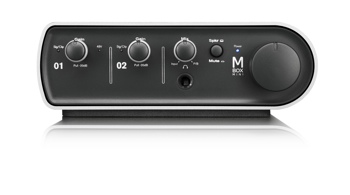
Mbox Mini

This interface is a 2-channel USB Audio Interface with 1 Mic Preamp and 1/4" Line/DI. Although this is one of the cheapest at around $330 it is very limited as to how many inputs can go into protools.


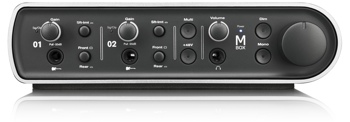
Mbox
This interface is a 4-channel USB Audio/MIDI Interface with 2 Mic Preamps, DI, S/PDIF, Softclip Limiters, and Onboard. This interface give just a little more inputs than the mini but is still in the lower levels of professional interfaces. This hardware goes for around $550.


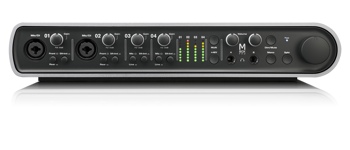
Mbox Pro

This interface is higher up in the hardware food chain providing 8-channel FireWire Audio/MIDI Interface with 4 Mic Preamps, DI, S/PDIF, Softclip Limiters, and Onboard DSP. At $750 this interface is a little less affordable for those only willing to pay the minimum in gear.


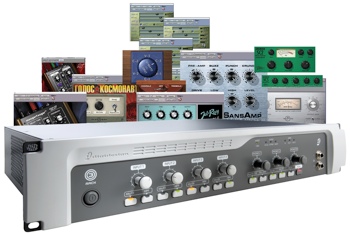
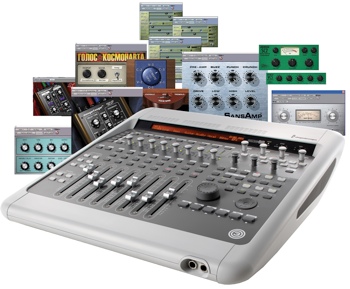
Digidesign 003 Rack and 003 Factory
These two interfaces are pretty much the same thing only in different packages. Both interfaces are at the top of the line for protools LE users. Both offer complete functionality with the protools software.
           
003 Rack
           
                8 redesigned discrete analog inputs (4 mic/line/instrument (DI) preamps; phantom power selectable in two channel increments)
                Alternate Source Input for monitoring -10 dBV audio equipment (tape players, CD players, etc.) directly to the monitor outputs
                8 discrete analog outputs, all balanced +4 levels, plus a separate balanced monitor output
                Improved 24-bit/96 kHz converters
                Monitor output includes dedicated volume control knob
                2 Headphone outputs include dedicated volume control knobs
                Word Clock
                8 channels of ADAT optical I/O
                2 channels of S/PDIF I/O
MIDI I/O - 1 input port/2 output ports (16 channels in/32 out)

003 Factory
                Eight redesigned discrete analog inputs (four mic/line/instrument (DI) preamps; phantom power selectable in 2-channel increments)
                Alternate Source Input for monitoring -10 dBV audio equipment (tape players, CD players, etc.) directly to the monitor outputs
                Eight discrete analog outputs, all balanced +4 levels, plus a separate balanced monitor output
                Improved 24-bit/96 kHz converters
                Monitor output includes dedicated volume control knob
                Two headphone outputs include dedicated volume control knobs
                Standalone MIDI controller mode
                Word clock
                Jog/shuttle wheel
                Eight channels of ADAT optical I/O
                Two channels of S/PDIF I/O
MIDI I/O - one input port/two output ports (16 channels in/32 out)

Monday, February 7, 2011

Pro Tools 9


Avid (a.k.a  Digidesign), inventor of pro tools has once again out done themselves. In the past year and a half the industry standard and world-renowned DAW software pro tools, was reinvented. The company came out with pro tools 8 in mid 2009 replacing the previous 7.4 version. This upgrade was highly anticipated because of its new features that are listed below.

         Pro tools 8
Beautiful, redesigned interface with new enhancements and customizability
Comprehensive collection of professional sound-processing plug-ins, plus 20 new effects
Score Editor and MIDI Editor windows offer comprehensive composing tools
Create a flawless performance using new track compositing features
Check for Updates feature keeps Pro Tools and plug-ins up to date
QuickTime HD support on Mac OS X-based systems
Lock regions to the timeline to prevent them from being moved or edited
Five new groundbreaking virtual instruments for music creation
Expands Pro Tools LE and M-Powered systems to support up to 48 mono or stereo audio tracks
Transpose audio regions in real time with Elastic Pitch
Automation and Controller lanes provide easy editing access
Windows Vista (32-bit Business or Ultimate) support on Pro Tools HD
Use more plug-ins without bussing, with access to 10 inserts per channel
Supports files up to 4 GB, allowing for sessions with longer files and higher sample rates

Of course, with any new software there are bound to be some problems. Well avid, the company behind pro tools does an incredible job of listening to their customers and taking their suggestions to heart. With numerous problems arising, avid started working on all the suggestions given to them and thus was born pro tools 9.

Not only did pro tools 9 (released late 2010) comply with everything that the consumers desired, but it exceeded everyone’s expectations. Pro tools 9 opened up a whole new world of possibilities but eliminating one giant factor. All previous versions of pro tools required a piece of hardware to run the software. This one feature allows the user to open up pro tools where and when ever possible.

This advancement in the software is not the only thing that was added. As a matter of fact the entire program was re-invented and now features all the elements listed bellow.

         Pro tools 9 
Single, Unified Version of Pro Tools
• Pro Tools 9.0 provides a single, unified installer for Pro Tools and Pro Tools HD
• New Pro Tools 9.0 PACE copy protection with iLok USB key
Pro Tools Audio Engine
• Support for Core Audio hardware (including Mac built-in audio with supported Core Audio drivers installed
• Support for ASIO hardware with supported ASIO drivers installed
• New Pro Tools Playback Engine settings
• Current Engine setting for selecting which Audio engine to use
• Pro Tools Aggregate I/O option for using the built in audio on Mac
• Delay Compensation settings for all versions of Pro Tools
• New Pro Tools Hardware settings
• Ability to select Core Audio and ASIO interfaces
• Launch Setup Application command for Core Audio and ASIO audio interfaces
Mixing and Recording
• Increased number of audio and MIDI tracks
• Increased number of internal mix busses
• New Track and Send Output selector commands for faster, simplified signal routing and mixer configuration
• Multiple Stereo Pan Depth options
• 7.1 and 7.0 standard HD surround formats (Pro Tools HD and Pro Tools with Complete Production Toolkit 2 only)
• Support for EUCONTM for controlling Pro Tools with EUCON-aware control surfaces
Import and Export Options for All Pro Tools Systems
• Advanced Import Session Data (formerly Pro Tools HD only, or Pro Tools LE with DV Toolkit 2 or Complete Production Toolkit only)
• Import AAF and OMF sequences (formerly with the Digi Translator 2.0 option only)
• New AAF import features and enhancements:
• New Locators To Import setting for importing locators from Media Composer–generated AAF sequences
• Export AAF and OMF sequences (formerly with the Digi Translator 2.0 option only)
• Avid Interplay Support with Mac
• Ability to check data into and out of Avid Interplay directly with the Interplay Access browser
• Export MP3 (formerly with the MP3 Export option only)
• Export Session as Text (formerly Pro Tools HD only)
What’s New for Pro Tools LE Users
I/O Setup Improvements
• Session and System settings
• Output and internal mix busses
• Ability to Import I/O Settings by page
• Overlapping Paths
• Improved session interchange
Advanced Digi Base Features
• Advanced search features
• Digi Base Catalogs
Editing Features
• Auto-Scrolling tracks in the Mix and Edit windows
• Advanced Beat Detective features
• Separate multiple tracks
• Collection mode
Delay Compensation
• Delay Compensation option, engine, view
• Low Latency Monitoring During Recording
• Delay Compensation on Auxiliary Input tracks, MIDI

As you can see from all the added features, pro tools 9 really stepped up its game. Combining the old pro tools software with the more advance and professional pro tools HD allowed avid to give the customers what they wanted and even what they didn’t know they wanted.

Pro tools 9 has again raised the bar on what is considered the industry standard and I can not see any of the competitors stealing that title.